
THOX
DigitalHuman
Agent
Router

THOXY
Workspace assistant
Router
Finds the right path for your work.
ID THX-001
THOX.AILOCAL FIRST
ThoxOS™ is local ownership, on every device. MeshStack™ is private distributed ownership, opt-in clustering. ThoxWork™ is the daily workspace for corporate and business teams across THOX devices and authorized resources.
Your AI. Your Data. Your Rules.
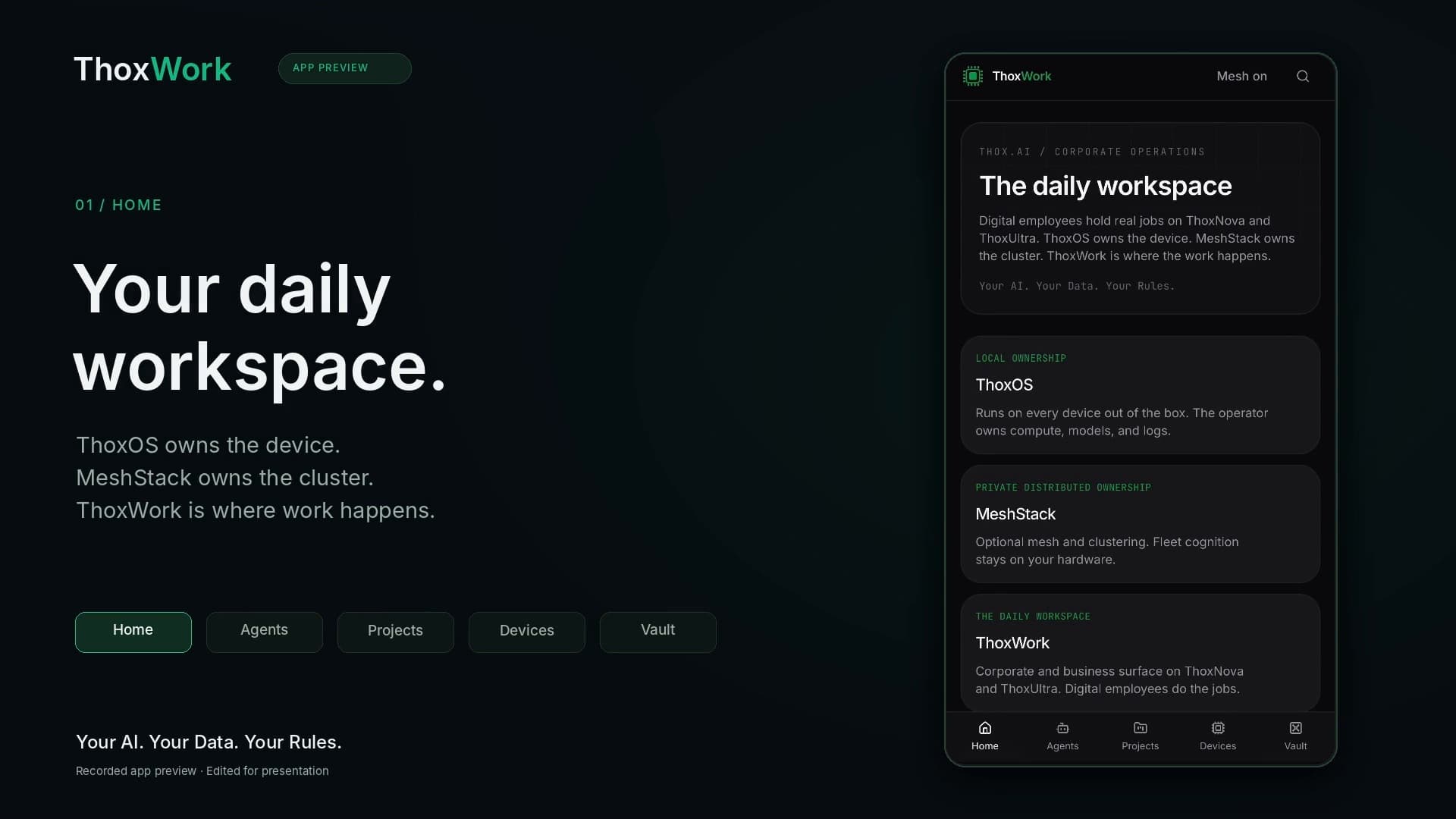
Home, then jobs and activity, then Agents, Projects, Devices, and Vault. Thirty-eight seconds, start to finish.
Each one holds a role, a ThoxLoop seat, a privacy boundary, and a pinned device. THOXY is the front door. Ava, Mira, Kai, Sera, Nova, Helix, Rhea, and Atlas sit on the mesh. ThoxEmployee is the local employee OS for bringing your own roles and instructions into a workspace you control.
See how ThoxEmployee fitsExplore employee profiles, reviewed team workflows, and the difference between browser transfer and the hosted workspace.
Build your team in ThoxEmployee, run an ordered task, and review its written handoffs. The hosted guest demo has daily call limits and expires after 24 hours. ThoxWork remains Coming Soon.
Rolodex is the ThoxEmployee platform app powered by THOXY™. Open a live sneak peek of the digital-employee roster and start a conversation.
Open Rolodex sneak peekOpens in a new tab.Digital Employees
A team of AI-powered digital humans, built for real work.
Your AI. Your Data. Your Rules.™
Spin to explore
Browse our digital employees.
Select a digital human
Learn about their role and skills.
Start the conversation
Watch their intro and chat.
DigitalHuman
Agent
Workspace assistant
Router
Finds the right path for your work.
ID THX-001
THOX.AILOCAL FIRST

DigitalHuman
Agent
Chief of staff
Orchestration
Keeps everything moving forward.
ID THX-002
THOX.AILOCAL FIRST


DigitalHuman
Agent
Knowledge steward
SME
Finds, organizes, and connects knowledge.
ID THX-003
THOX.AILOCAL FIRST


DigitalHuman
Agent
People operations
Manager
Supports people, empowers teams.
ID THX-008
THOX.AILOCAL FIRST


DigitalHuman
Agent
Strategy research
Architect
Sees what's next and helps us get there.
ID THX-009
THOX.AILOCAL FIRST

9 DigitalHuman agents, THOXY first.
Finance goes to Helix, a privacy or policy review to Sera, MagLink to Nova, strategy to Atlas. The employee returns a work product on-device, or through THOX Router when it is available.
Open Atlas. A job sitting in judge can be Released or Returned to student. Released work can be Promoted to vault.
The command palette reaches Home, Agents, Projects, Devices, and Vault. Mesh on in the header shows the full roster, and the default view is THOXY only.
Select an authorized THOX device or MeshStack resource and see who is pinned to it.
Shelves for skills, templates, knowledge, and memory, scoped HOT, WARM, COLD, or VAULT. Writes are append-only and carry a named owner.
Use Migration Studio to review a bot configuration you own. The local employee kernel holds roles and instructions; the supervised task workspace runs ordered team tasks and keeps written handoffs ready for review.
Move a ThoxPack employee-profile file between the ThoxEmployee task workspace and the ThoxWork review surface. Inspect the roster, roles, and full instructions, then explicitly review the profiles you choose to save. The exchange is file-based.
The ThoxWork review surface keeps profiles in the current browser. Export a reviewed pack when you want to move them. Saving a profile does not register it with the backend, start tasks, or activate tools and routines.
ThoxEmployee kernel policy checks record their allow or deny result and the rule used. Export the append-only audit history as CSV to inspect those decisions. Recognized secret patterns in event details are redacted; review exported records before sharing.
Keep the role and instructions you own. Prepare and review employee JSON in your browser, then choose whether to import it into the hosted workspace.
Synthetic illustrated walkthrough
Choose a source and explore the steps. This illustration does not convert or import files.
01Prepare file
Grok
Your instruction text
02Review instructions
Read the full profile
Name, role and raw instructions
03Acknowledge review
Your review matters
Acknowledge before moving on
04Virtual workspace
ThoxEmployee
Browser rehearsal only
Step 1 of 4Prepare file. A synthetic instruction file is ready to start.
Prepare instruction text for your other AI assistants in your browser. Review the employee JSON and rehearse an import before using it in your workspace.
Copy instructions you own or are authorized to move, or choose a supported instruction file or employee JSON. Source accounts stay separate.
Review names, roles, source IDs and full instructions. Try an import in the virtual workspace; it stays in browser memory and makes no AI call.
Download reviewed employee JSON and open the hosted workspace separately. Selecting the file there uploads the profiles for a new review before you confirm import.
ThoxWork remains Coming Soon. An operator reviews the employee package and configures registration with the THOX backend and ThoxWork roster. Browser rehearsal and hosted import do not register an employee with ThoxWork.
Transfer uses instruction text you provide. It does not connect source accounts or transfer memory, credentials, logins, subscriptions or tool access. Importing a profile does not start work.
Locked navigation